
Refills that arrive right when your subscribers need them
Upswing is a Shopify subscription app for supplements and other consumables. Enter pack size and daily dose once, and it shows which delivery frequency matches how long a pack lasts.

Next order arrives
About 37 days early
2 kg pack, every 8 weeks
Shipped this month
- Export your subscriber list.
- Test two cancellation flows side by side and keep either one.
- Subscribers get an email before their card expires.
ChangelogRefill calculatorSecurity and privacyNot affiliated with Shopify
Check each delivery frequency against how long a pack lasts
Enter pack size and daily dose once per product. The refill check lists each delivery frequency with the day the next order arrives: days early, or days after the pack runs out. Which frequencies to offer stays your choice.
| Pack | Daily dose | Days of supply |
|---|---|---|
| 60 capsules | 2 | 30 |
| 90 tablets | 1.5 | 60 |
| 120 capsules | 2 | 60 |
| 100 servings | 2 | 50 |
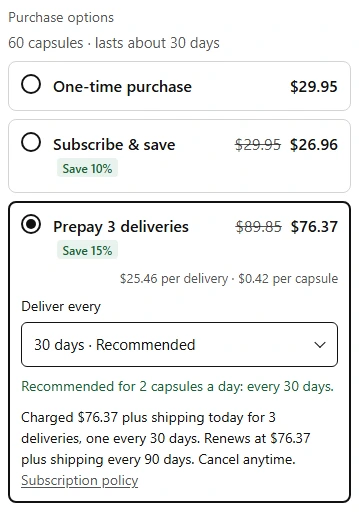
Subscribe and save on the product page
Shoppers pick one-time purchase or a subscription, with the saving shown in the price. The same block sells prepaid plans and bundles.
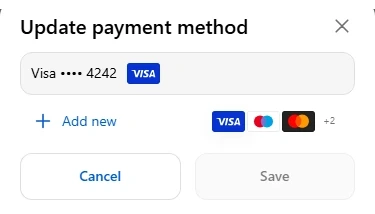
Subscribers change their card and address in their Shopify account
Every subscription sits in the Shopify customer account, so subscribers sign in with the account they already use for orders. Each change says what it does before it is confirmed.
Retry failed payments on a schedule you set
By default the app retries 1, 3, 6 and 10 days after a payment fails. After the last retry, your setting decides what happens to the subscription.

Three steps to the first subscription
- 01
Install from the Shopify App Store
The app then opens in the Shopify admin.
- 02
Add the subscribe block in the theme editor
It sits on the product page beside one-time purchase.
- 03
Enter pack size and daily dose
The refill check then shows each delivery frequency against how long a pack lasts.
A monthly price with no fee per order
Every plan has every feature. The charge appears on the Shopify invoice.
At 320 subscriptions with one $45 order a month, Recharge Starter costs $429 a month and Upswing $49.
Planned prices
- FreeUp to 50 active subscriptions$0 / month
- StarterUp to 250 active subscriptions$19 / month
- StandardUp to 750 active subscriptions$49 / month
- BusinessUp to 1,500 active subscriptions$99 / month
- ScaleUp to 3,000 active subscriptions$199 / month
- High VolumeUp to 6,000 active subscriptions$399 / month
Every feature on every plan
Selling subscriptions
- Subscribe and save block on the product page, added in the theme editor
- Prepaid plans: several deliveries paid at once
- Fixed bundles with a subscriber discount and product images
Customer portal and cancellations
- Every subscription in the Shopify customer account
- Change the payment method
- Change the delivery address
Failed payments
- Retries on a schedule you set
- Your setting decides what happens after the last retry
- Retry on a backup card, if the subscriber opts in
Managing subscriptions
- Search subscriptions by name or email
- Card on file and address on each subscription
- Out-of-stock renewals follow your setting
Analytics
- Failed payments recovered in the last 30 days
Integrations
- Shopify tags on subscribers and their orders
- Tags your other Shopify apps can read
Questions before installing
What does a store need?
Shopify checkout with a payment provider that supports subscriptions, such as Shopify Payments, and Shopify customer accounts turned on so subscribers can manage their plan.
Where is subscriber data stored?
Coming: on Google Cloud in an EU region. Card numbers never reach the app; payments run through Shopify. Details on the security and privacy page.
Does the app change delivery dates on its own?
No. Orders move only when you or the subscriber move them. The app shows estimates, and you choose which delivery frequencies to offer.
Can existing subscribers move over from another app?
Not yet. Importing subscriptions from another app is not built. The switching page shows what is planned.
What happens to subscriptions after an uninstall?
Renewal orders stop while the app is uninstalled. Orders already placed stay in Shopify as normal orders.
Does it work with my other Shopify apps?
The app puts Shopify tags on subscribers and their orders: Subscription, Subscription First Order and Active Subscriber. Your other Shopify apps can read them.
Who answers support questions?
The people who build the app, by email, in English.
Free up to 50 active subscriptions
Then from $19 a month, by the number of active subscriptions.
Planned prices